For restaurants on Toast and QuickBooks Desktop
Yesterday's sales are in QuickBooks before you open.
Every morning, each store's day goes into QuickBooks Desktop, balanced to the penny: sales, tax, tips, card and delivery payments, and cash, posted to the accounts your bookkeeper already uses.
- Runs on your QuickBooks PC
- Nothing goes in twice
- Undo any entry
Stop retyping the sales summary
Toast already has the numbers. QuickBooks needs them every day, for every store.
Every morning, by hand
- Open Toast's sales summary for each store
- Retype sales, tax, tips and every payment type
- Hunt for why sales and deposits don't match
- Do it all again tomorrow
Every morning, with OK Book Sync
- Each store's day is already in, and it balances
- Payments made on other days go to On Account, cash differences to Over/Short
- Anything unusual waits for you, with the reason
- Same accounts, same way, every store, every day
Set up once
Three steps, then it runs every morning
- 01
Connect Toast
Paste your restaurant's API key from Toast Web, or point the app at Toast's daily summary emails.
- 02
Connect QuickBooks Desktop
It reads your chart of accounts and the last 90 days of entries and deposits, then suggests an account for every Toast line and tells you why. It only reads: nothing in QuickBooks changes until a day goes in.
- 03
Wake up to it done
Each morning every store's day goes in on its own, or waits for your OK. You hear from it only when something needs you.
Product
See exactly what goes into QuickBooks
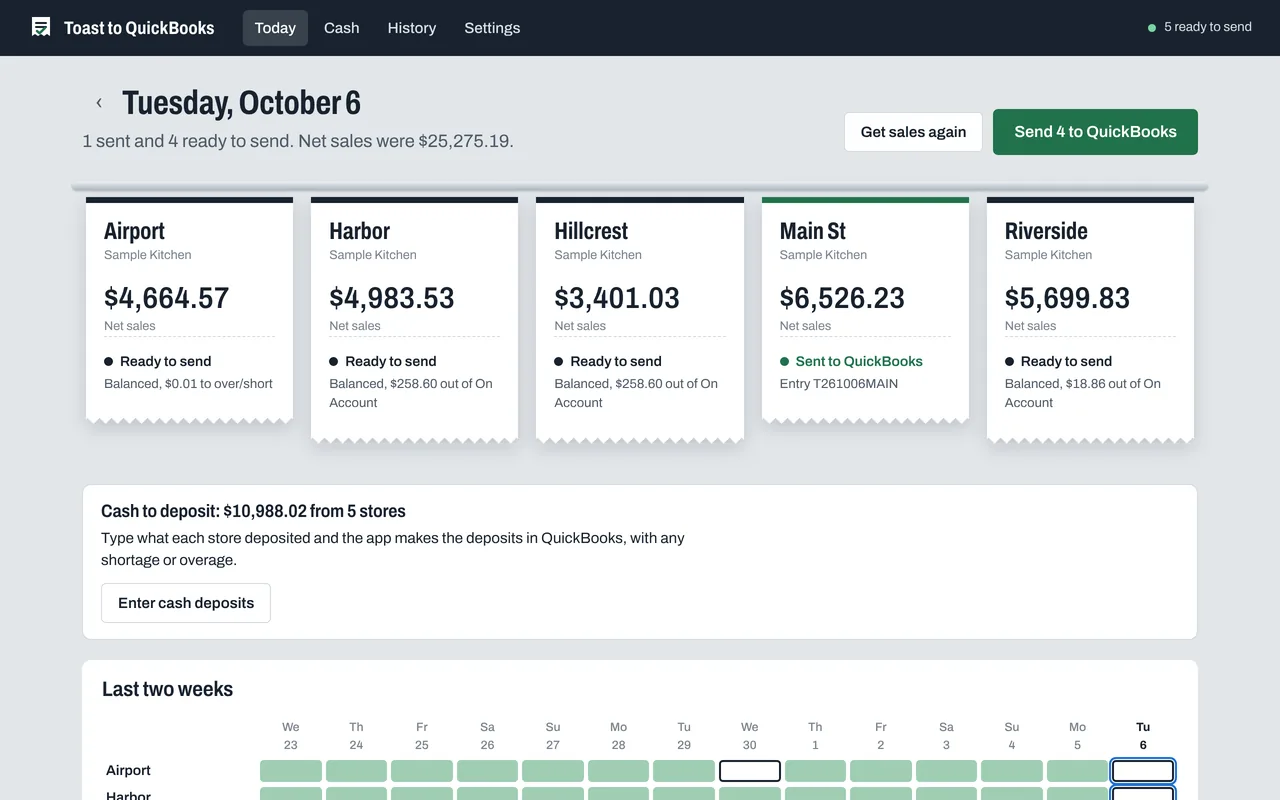
Every store at a glance
- One ticket per store: ready, sent, or needs you
- Send every store in one click, or let it run each morning on its own
- Two weeks of history, store by store
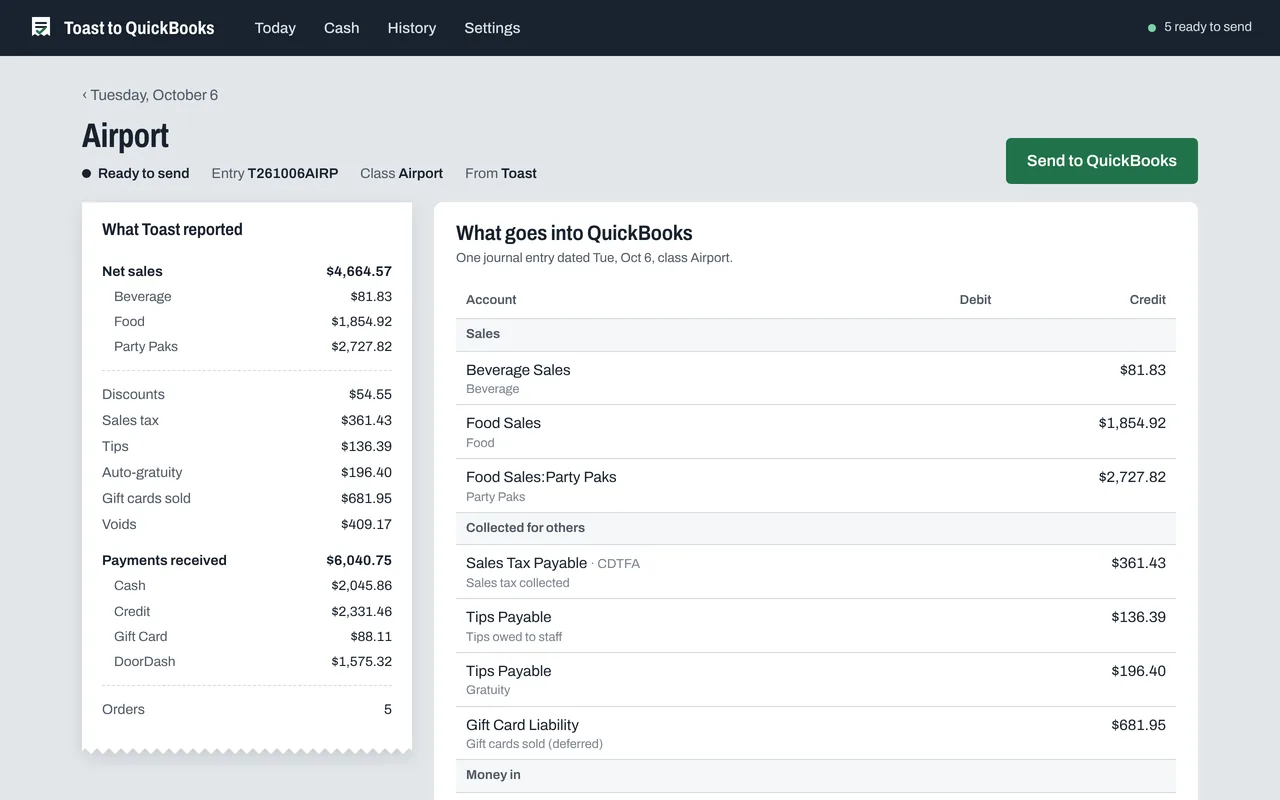
Every line explained
- What Toast reported, side by side with what goes into QuickBooks
- Sales by menu category or by channel: dine in, take out, delivery
- Timing spelled out: orders not paid yet, orders paid on another day
It follows your books
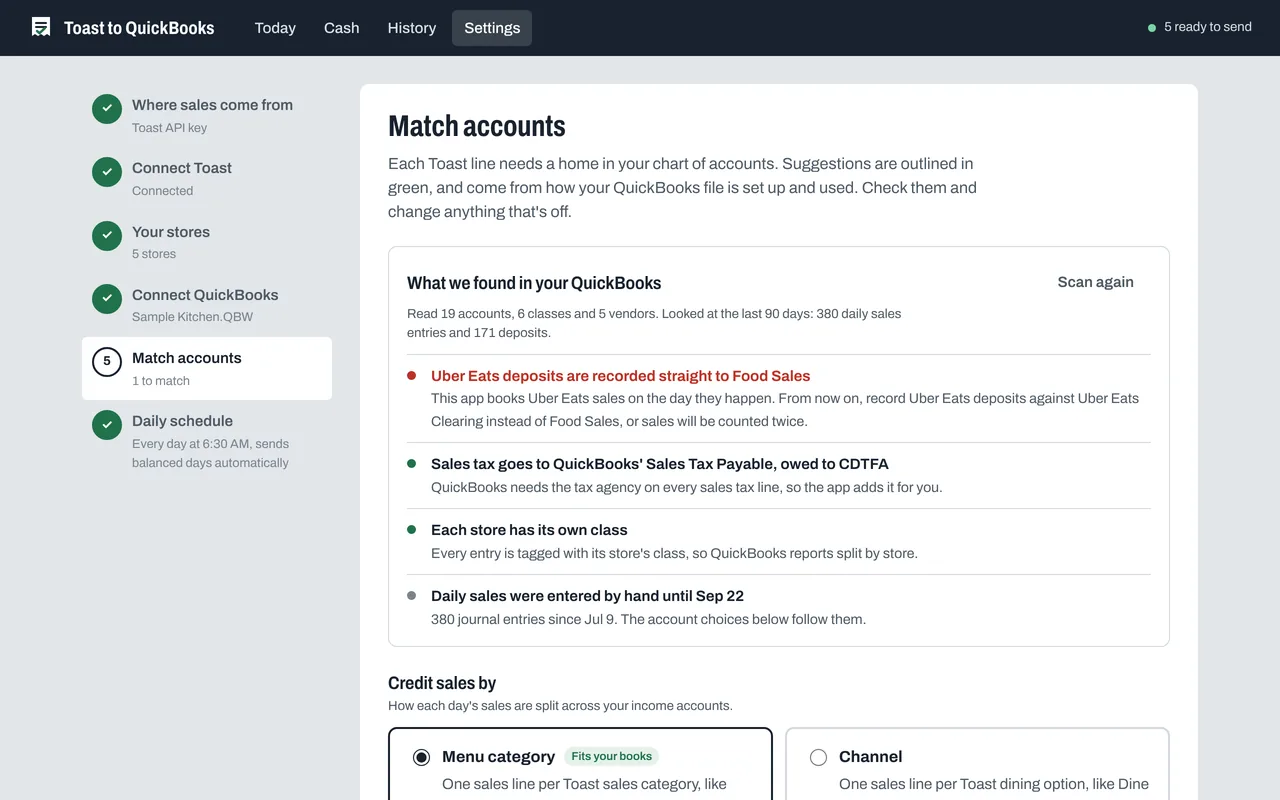
- Reads how your chart of accounts and past entries are set up
- Suggests every account, with the reason it picked it
- Flags anything that would count sales twice
Cash deposits, with over/short
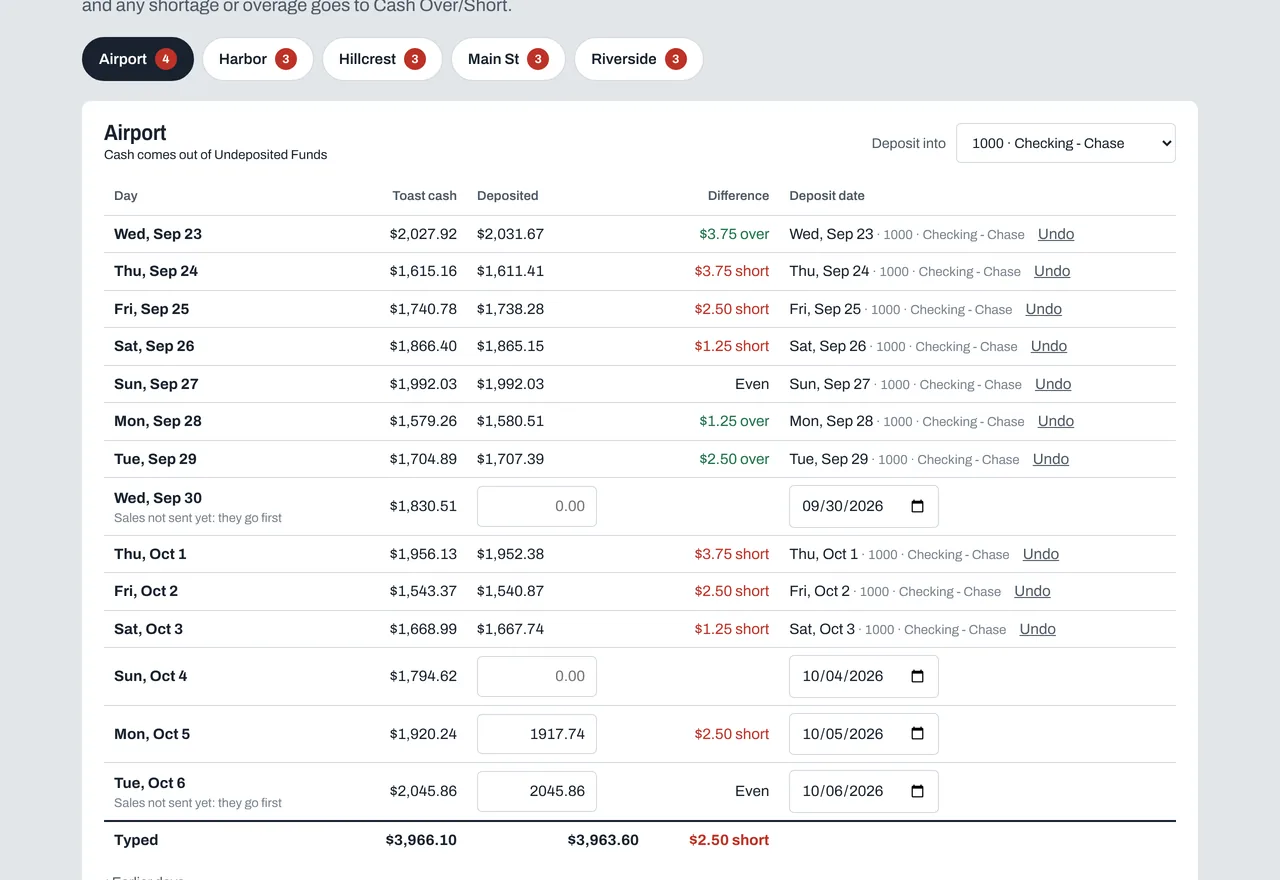
- Type each day's deposit, a store at a time, and check the total against the deposit slip
- Shortages and overages go to Cash Over/Short
- Each deposit clears that day's cash out of Undeposited Funds. Or book the whole day as one Make Deposits, the way many restaurants do by hand
Why it's different
Built for how restaurants book sales
Made for QuickBooks Desktop
It works with your company file directly, on the PC where QuickBooks runs. No Web Connector and no files to import.
Your data stays with you
Sales go from Toast to your PC to QuickBooks, with no cloud service of ours in between.
Every day ties out
Timing differences go to On Account and cash differences to Over/Short, so every day balances to the penny.
Nothing goes in twice
Each day is marked by store and date and checked against QuickBooks before it goes in. Undo takes it back out cleanly.
Multi-store from day one
One entry per store per day, tagged with each store's class, or sent to its own company file.
Journal entry or Make Deposits
Each day goes in as a journal entry, or as one Make Deposits with its cash, whichever way your books already work.
Your numbers
What retyping costs you
Change the numbers to match your stores.
Pricing
One price per store. Everything included.
Sales Sync
Available now- Every store's day in QuickBooks, every morning
- Cash deposits with over/short
- QuickBooks scan and account matching
- Undo and full history
- A free setup call with us
14 days free. No card to start.
Invoice Scanner
Coming soonSnap a vendor invoice. The bill goes into QuickBooks, coded to the right accounts. Get it first, at a founding-customer price.
You're on the list. We'll email you when it's ready.
More than 15 stores? Talk to us about group pricing.
Next: Invoice Scanner
Snap the invoice. The bill's in QuickBooks.
Take a photo of any vendor invoice, from your broadline distributor to the local produce supplier. It reads every line, checks the math, and enters the bill in QuickBooks, coded to the right accounts.
You're on the list. We'll email you when it's ready.
Built in our own restaurants
I run restaurants on Toast and QuickBooks Desktop. Every day, someone on my team typed each store's sales into QuickBooks by hand. I built this to do it for us, and now I'm opening it up to other restaurants.
What do I need to use it?
Toast, and QuickBooks Desktop (Pro, Premier or Enterprise) on a Windows 10 or 11 PC. Sales come in through your restaurant's own Toast API access, or from Toast's daily summary emails. The app installs on the PC with QuickBooks.
Does it work with QuickBooks Online?
Not today. It's built for QuickBooks Desktop.
We book each day in Make Deposits. Can it do that?
Yes. Turn on one Make Deposits per day and each day goes in the way you book it by hand: sales and tax in; cards and delivery taken back out; any shortage or overage; the cash to the bank. It's dated the sales day.
Will it match how my bookkeeper does things?
It reads your last 90 days of entries and deposits and suggests accounts the way they're already used, with the reason for each. You check them once and can change any of them later.
What happens when a day doesn't balance?
Sales and payments that land on different days go to On Account, and pennies of rounding to Over/Short. A day with something unusual, like a card payment that isn't final yet, waits for you with the reason.
What happens when the free trial ends?
Subscribe from the app: open Settings, then Your plan. If you don't, nothing is lost. Your history stays, and you can still undo days, but new days stop going to QuickBooks until you subscribe.
How does billing work when we add a store?
You pay $25 a month for each store you have turned on in the app, prorated to the day. Turn a store off and the next bill goes down. Cancel anytime from Settings, under Manage billing.
Can I undo a day?
Yes. Undo removes it from QuickBooks and brings it back as a draft. Nothing else in QuickBooks changes. Cash deposits have their own undo.
Is my data safe?
The app runs on your QuickBooks PC. Your Toast key is encrypted for your Windows user, and sales go straight from Toast to QuickBooks, never through our servers.
How does setup work?
Install it on the PC with QuickBooks, connect Toast, connect QuickBooks, and check the suggested accounts. We'll walk through it with you on a free setup call.